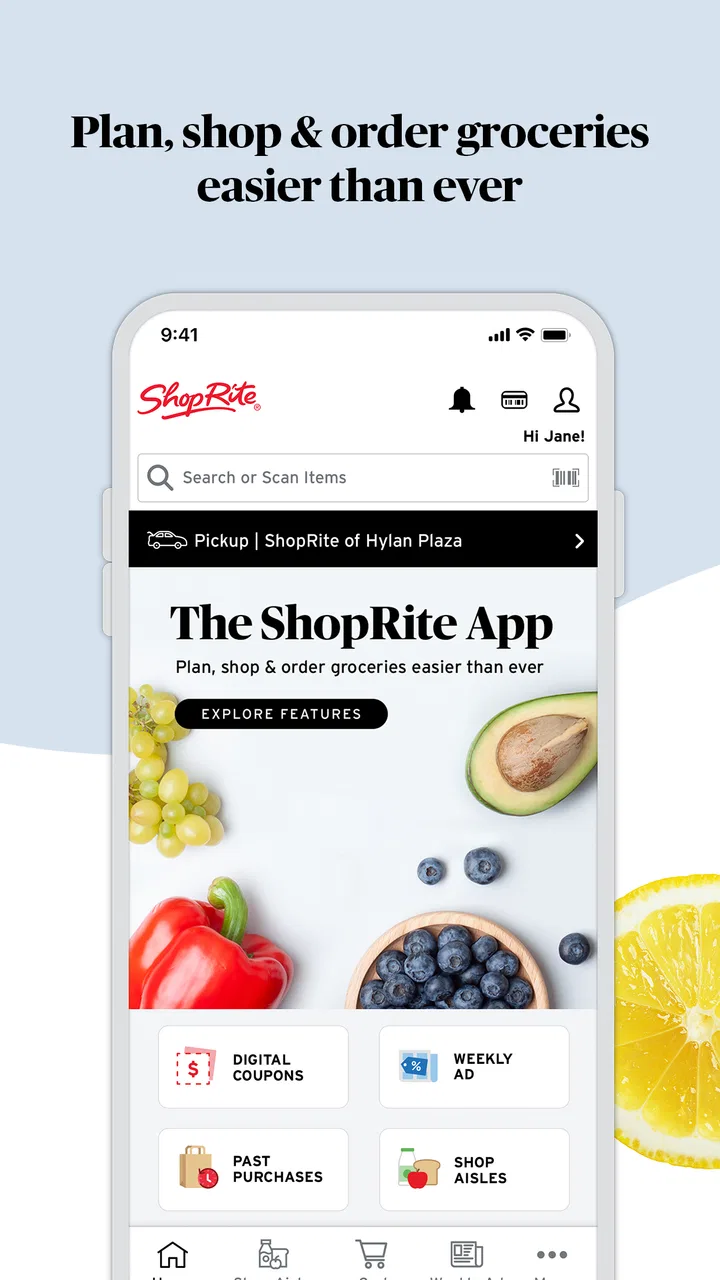
ShopRite: Groceries & Savings
- 4.7
- Rating
- 1.00M
- Installs
- Free
- Price

 Analysis by App-foxy
I use ShopRite: Groceries & Savings as a practical companion to a regular supermarket trip rather than as a complete replacement for walking through the store. It brings weekly deals, coupons, shopping-list planning, and pickup or delivery ordering into one place, which makes it especially useful when I already know where I shop and want to control the total before checkout. The app is free, open to Everyone, and developed by Wakefern, so its value is closely tied to how convenient ShopRite is for your household.
My overall impression is positive because the app focuses on the parts of grocery shopping that usually create the most small annoyances: remembering what to buy, finding current savings, and deciding whether to collect an order or have it brought to the door. It is not a universal grocery marketplace, and that matters. If you do not shop at ShopRite, or if you prefer comparing several supermarkets in one screen, this will feel limited. For an existing ShopRite customer, though, the focused approach is its main strength.
How the current ShopRite experience works
The first thing I noticed is that the app makes most sense when I treat it as a planning tool. Browsing weekly offers before making a list changes the order in which I shop: instead of writing down familiar products first and checking discounts afterward, I can begin with the items that are useful and currently reduced. That small change helps me avoid buying a more expensive version simply because it was the first one I remembered.
You May Also Like

 Blood Strike: 2.5 Anniversary
Blood Strike’s Loadouts Turn Every Drop Into a Tactical Gamble
A close look at Blood Strike’s custom loadouts: how fast access to signature weapons reshapes its battle royale rhythm, rewards preparation, and narrows the gap between fights.

 Pandora - Music & Podcasts
Pandora’s Music Is Easy to Start, but Harder to Recover
Pandora’s strength is its low-effort path from a seed to a station. Its weak spot is how much confidence it asks you to place in connection, setup, and quiet recovery.

 8 Ball Pool
 Is Built on Rivalries, Rematches, and Routine
A close look at the rivalries, rematches, shared routines, and unanswered safety questions that turn a quick pool match into a persistent mobile community.

 Samsung Music
’s Quiet Strength Is Playing What You Already Own
Its reach comes less from spectacle than from dependable access to a personal library. That simplicity is both the app’s strongest retention engine and its ceiling.

 AccuWeather: Weather Radar
AccuWeather Review: A Quick, Clear Forecast for Everyday Decisions
For everyday plans, the best forecast is the one you can understand quickly. AccuWeather makes rain timing, radar, and local conditions easy to act on, with a few trade-offs.

 Hill Climb Racing
Why Hill Climb Racing Still Turns Crashes Into One More Run
A tiny car, a bumpy hill and one more upgrade: Hill Climb Racing keeps resurfacing because its simple chaos makes every near-miss feel personal.
More From Our News Desk



The shopping-list function is more valuable than it sounds. A list is not only a memory aid; it gives me a place to separate planned purchases from impulse ideas. I can build it gradually during the week, then use it as a final check before placing an order or heading into the store. For a family, this is useful when several people contribute requests. For one person, it helps prevent the common situation of arriving home with snacks and forgetting a basic ingredient.
Coupons are another central part of the experience. I find them most useful when I browse them before settling on a meal plan. A coupon can change which brand or size makes sense, but the saving is only meaningful if the product was already on my list. My practical advice is to start with meals and household needs, then use the deals to adjust the plan. Starting with every attractive offer can easily turn a savings feature into a reason to spend more.
The ordering side gives the app a second role. I can use it for pickup when I want to avoid walking through the store, or delivery when convenience matters more than collecting the bags myself. This is a helpful choice for a busy evening, a large planned shop, or a household where getting to the supermarket is difficult. I would still review the final basket carefully, because a digital order can make it easier to overlook substitutions, quantities, or items added while browsing.
What has changed in the current version
The current version is 26.5.0, and the product has been available since June 2, 2017. Those details suggest an established shopping service rather than a new experiment. In my experience, that maturity shows in the way the app brings several supermarket tasks together instead of treating coupons, lists, and ordering as unrelated tools.
I would not interpret a version number alone as proof that every part of the app has been redesigned. What I can say is that the present experience is built around a clear combination: savings discovery, list creation, and fulfillment choices. That combination is more useful than a coupon-only app because the saving is connected to a purchase plan, while the ordering options make the same plan usable in different shopping situations.
For someone who has used ShopRite digitally before, the biggest practical effect is having one current workspace for preparing a trip and completing it. Existing users do not need to switch between a separate notes app for the list and another place to look for offers. I especially like this when I am preparing a larger shop, because the list gives structure before I move into the ordering stage.
New users should expect a little adjustment. Grocery apps are not difficult in principle, but the useful routine is not simply opening the app at the store entrance. The better workflow is to check offers, make a deliberate list, review the basket, and then choose in-store shopping, pickup, or delivery according to the day. Once that habit is established, the app feels less like a digital flyer and more like a lightweight shopping system.
A realistic weekly grocery routine
Imagine I am planning dinners for the next several days and need breakfast items, produce, cleaning supplies, and a few pantry staples. I would first look through the current deals for products that match the meals I already intend to make. Next, I would add the full ingredient list, including items that do not have a coupon. Then I would review the list for duplicates and decide whether pickup is worthwhile for the size of the order.
Before submitting anything, I would check the basket line by line rather than relying on the total alone. This catches accidental duplicate quantities and makes it easier to notice when a deal has encouraged an unnecessary substitution. If I need the items at a particular time, pickup may be the better balance between convenience and control. If I am working late or cannot make the trip, delivery becomes more attractive, even if collecting the order would otherwise be simpler.
This workflow reveals an important trade-off: the app can save time only when I do some preparation first. Browsing randomly while hungry is not the best use of its features. The strongest results come from treating the app as a place to make decisions before shopping, not merely as a digital checkout screen.
Where it compares well with ordinary alternatives
Compared with a paper list, ShopRite is more flexible because the list can be prepared away from the store and connected to the rest of the shopping process. A paper note can be faster for a tiny trip, but it cannot help me browse current offers or move the same plan into pickup or delivery. For a weekly shop, the app gives me more room to revise quantities and rethink the basket before spending.
Compared with a general notes app, it has a more direct relationship with grocery shopping at ShopRite. A notes app is better for unusual reminders such as “check the cupboard” or “buy the item for Saturday,” but it does not bring those reminders together with supermarket deals and ordering. I would use a notes app alongside this one only when my list includes tasks that are not actual products.
Compared with a broad shopping platform that covers several retailers, this app is narrower but potentially more focused. A multi-store service is the better choice if my priority is comparing prices across different supermarkets. ShopRite’s advantage is convenience for people who already prefer its stores and want the digital tools to match that choice. The right decision depends less on which app has more features and more on whether you want one store handled well or several stores compared in one place.
Small habits that make the app more useful
The best savings habit is to build the list before chasing the coupons. I add essentials first, then examine offers for sensible swaps. This protects the budget from the false economy of buying an item only because it appears discounted. It also makes the final order easier to review because every product has a reason for being there.
A second useful habit is keeping the list active throughout the week instead of starting from an empty screen on shopping day. When I notice that a household item is running low, adding it immediately is safer than trusting my memory later. I can then use the weekly-deal section as a final planning pass rather than trying to reconstruct everything under time pressure.
A third is separating “must have” products from flexible purchases in my own planning. The app can help organize a shopping list, but the decision about what can be replaced or skipped still belongs to me. This matters when a preferred product is unavailable or when a deal makes a different size look attractive. A flexible plan is easier to complete through pickup or delivery than a list where every brand and package is treated as non-negotiable.
For pickup and delivery, I would also leave time to inspect the completed basket. Digital convenience does not remove the need for a final check. I look at quantities, planned meals, and household basics before confirming. That extra minute is particularly worthwhile on a large order, where one mistaken tap can have a bigger effect than it would on a quick in-store visit.
Who will appreciate it most
This app is a strong fit for regular ShopRite shoppers who want weekly offers and coupons in the same place as their list. It is also well suited to households that repeat a shopping rhythm every week, because the planning process becomes easier once the app is part of the routine. Parents, commuters, and anyone trying to make a supermarket visit more predictable can benefit from preparing the basket in advance.
It is also useful for people who dislike wandering through the store without a plan. Pickup can turn a long visit into a more controlled collection, while delivery can remove the trip entirely when that option suits the order. The value is not only the time saved; it is the reduction in decisions made while distracted, tired, or in a hurry.
I would be more cautious recommending it to someone who shops at many different chains, prioritizes aggressive price comparison, or rarely buys groceries from ShopRite. In those cases, a broader comparison service or a simple list may be more appropriate. The app’s focus is helpful only when the store itself is already part of your shopping routine.
Remaining friction and practical limitations
The focused design also creates limits. The app is tied to ShopRite rather than serving as a neutral grocery planner, so it cannot replace a tool built around comparing multiple retailers. If I am deciding where to shop based on the lowest total across several stores, I would need another method for that comparison.
Coupons can require attention rather than delivering effortless savings. I still need to read the offer, choose products that fit my needs, and check the basket afterward. A deal is not automatically valuable if it pushes me toward a larger quantity or a product I would not normally buy. This is a limitation of the shopping process as much as the app itself, but it is important for anyone expecting every highlighted offer to reduce spending.
The list is convenient, yet it does not eliminate the need for personal organization. I still have to remember preferences, plan meals, and decide what can be substituted. People who want an app to create a complete grocery plan without much input may find this experience more hands-on than expected.
Delivery and pickup also change the rhythm of shopping. They are excellent when convenience is the priority, but a quick in-store trip can be simpler for a few urgent items. For a small purchase, opening the app, preparing the order, and arranging fulfillment may take more effort than grabbing the products directly. I see the strongest benefit when the basket is planned, substantial, or difficult to collect in person.
Trust, reach, and device expectations
The app has a 4.7 average from around 113 thousand ratings, with more than 1 million installs. That level of adoption makes it easier for me to view the service as a well-established option for ShopRite customers rather than a niche experiment. Still, popularity does not guarantee that every individual workflow will feel perfect, so I would judge it by how often I shop at the chain and whether pickup or delivery fits my routine.
It is free to install, which lowers the barrier to trying the list and savings features before deciding whether ordering is useful. The age rating is Everyone, making it suitable for a broad household audience. The minimum operating-system requirement is version 9, so users on older devices should check compatibility before planning to depend on it for a major grocery order.
Wakefern is the developer, and that connection reinforces the app’s store-specific purpose. I would not approach it as an independent coupon database or a general food-planning tool. Its usefulness comes from being close to the ShopRite shopping experience, which is precisely why it can feel more relevant than a generic list app for the right customer.
What I would watch over time
When I evaluate future updates, I would pay attention to how smoothly the app connects the three stages of shopping: finding worthwhile offers, organizing a realistic list, and completing an order without unnecessary friction. Improvements in any one area matter less if the handoff to the next stage remains confusing.
I would also watch whether the app continues to make savings understandable rather than simply prominent. The most helpful experience is one that lets me see which discounts fit my existing plan and which ones are likely to encourage extra spending. Clearer control over the basket would be more valuable to me than a larger collection of promotional cards.
For existing users, the main question is whether updates make familiar routines faster without making basic tasks harder to find. I prefer an app that preserves quick access to my list while adding useful refinements around ordering. For new users, the test is simpler: can I prepare a sensible ShopRite shop, review it calmly, and choose the right fulfillment method without feeling pushed into unnecessary purchases?
My final take
ShopRite: Groceries & Savings earns my recommendation for people who already shop at ShopRite and want one free app for planning, savings, and fulfillment. Its strongest quality is not any single feature; it is the way those features support a complete grocery routine. I can check offers, build a list, and decide whether to shop in person, use pickup, or request delivery according to what the week looks like.
I would skip it if my main goal were comparing several supermarket chains or if I only needed a very simple note for occasional purchases. For everyone else, especially regular ShopRite households, it is a useful way to make shopping more deliberate. My advice is to use the list first, treat coupons as planning options rather than invitations to spend, and review the final basket before completing it. Used that way, ShopRite: Groceries & Savings feels less like a promotional app and more like a practical organizer for the supermarket trips I already need to make.
FAQs for ShopRite: Groceries & Savings
01What is ShopRite: Groceries & Savings used for?
ShopRite: Groceries & Savings is designed to make grocery shopping easier by helping you browse products, check current prices and promotions, create a shopping list, and locate nearby ShopRite stores. The app also brings savings features into one place, allowing shoppers to review digital coupons, weekly specials, and eligible rewards before visiting the store or placing an order.
02Can I use the ShopRite app to order groceries for delivery or pickup?
In supported locations, the app allows customers to shop for groceries online and choose an available fulfillment option, such as store pickup or home delivery. Availability, fees, minimum order requirements, delivery times, and product selection can vary by store and ZIP code. It is best to enter your location first to confirm which services are offered in your area.
03How do ShopRite digital coupons and savings work?
The app lets you browse available digital coupons and savings offers, then load eligible discounts to your ShopRite account or loyalty profile. At checkout, qualifying offers are generally applied when the account is identified correctly. Each coupon may have its own expiration date, purchase limits, brand restrictions, and exclusions, so reviewing the terms before shopping can help avoid surprises.
04Do I need a ShopRite account or Price Plus card to use the app?
You can usually explore store information, products, and some promotions without signing in, but an account is important for accessing personalized savings and managing shopping activity. Linking your Price Plus loyalty information may be necessary to receive certain member prices, digital coupons, rewards, or online-order benefits. Registration requirements can vary depending on the feature and your location.
05Is ShopRite: Groceries & Savings free to download and use?
The ShopRite app is generally free to download from the official Android or iOS app store, and there is normally no separate charge simply for browsing products, viewing weekly savings, or creating a shopping list. However, purchases still cost money, and delivery or pickup orders may include service fees, delivery charges, taxes, or other location-dependent costs.
Pros
- Digital coupons can be clipped directly to your Price Plus Club card.
- Shopping lists help organize items before visiting the store.
- Weekly circulars make it easier to find current promotions.
- Order pickup can save time compared with shopping entirely in-store.
- Product search helps check availability and compare grocery options.
Cons
- Some features may require location access to show nearby stores and deals.
- Coupon terms and exclusions can make savings harder to understand.
- Pickup and delivery availability varies by store and time slot.
- The app may feel slow when loading weekly ads or large product lists.
- Account registration is needed to access personalized savings and orders.

ShopRite: Groceries & Savings
Gallery